
Designing the metadata schema is a critical task when deploying a Digital Asset Management (DAM) system. Metadata is the data that facilitates the search of assets in your DAM; the collection of metadata fields used in your DAM is called a “schema”. When users upload (or ingest) digital assets to the DAM, they complete a form based on the fields in the schema. A well-designed schema will ensure that digital assets in your DAM are searchable and usable.

Metadata is divided into two types, or “value pairs”: metadata fields and metadata values (the value that aligns to the field). For example, if our DAM stores digital assets of wristwatches, our metadata fields would include face color, band material, and brand. The corresponding metadata values would be silver, leather, and Timex.
Metadata Field Metadata Value
Face Color Silver
Band Material Leather
Brand Timex
Band Color Silver
Analog or Digital Analog
Where to Start
Organize metadata fields into categories in preparation of designing an effective metadata schema.
There are four categories of metadata fields:
- Content-related: Fields related to the content within the asset: model, color, features, for example.
- Native: Data embedded within the asset at production. Includes date taken, camera type.
- Administrative: Non-content fields related to the asset, like rights usage or archive date.
- System-generated: Data added when the asset is ingested: data added, ingest user.
When defining the fields for your metadata schema, review the categories listed above and define the relevant fields for each category.
Content-related
Content-related fields are, as the name suggests, fields that describe the content within the digital asset. All the metadata fields used in the previous example are content-related metadata fields as they describe the content within the digital asset – the wristwatch.
For example, in this image, the content would include:
Metadata Field Metadata Value
Face Color White
Band Material Metal
Brand Timex
Analog or Digital Analog
Another content-related field is the Description or Title. Too often, assets are ingested without a descriptive title for the asset; only the raw file name is uploaded, which is meaningless. A solid title value is a concise description of the assets – usually 40 characters or less. In the above example, a good title might be TIMEX Men’s Explorer Mod 402-1A Silver. With this title, the image would be returned in a search that included the brand, model, model number or color.
Now the question is how many fields? There is no optimal number. We’ve discovered that a comprehensive group of fields may be appealing, but unless the fields are designed as mandatory, it’s likely they won’t be populated by ingesting users.
List as many content-related features as possible. Determine which of these fields users are most likely to search for. Group the remaining features in a “feature” multi-select field (the user can select one or several options).
Native
Native metadata is information “hidden” within the digital asset. This information is referred to as Exchangeable Image File Format or EXIF data; it is information generated when the asset is produced and remains with the asset as it is and ingested and transferred from point to point. Think of it as the asset’s digital “fingerprint”. It is hidden but available to view in most DAMs or EXIF viewers. The following are typical “hidden” fields:
- Date and time photo was taken
- Camera Type
- Location
To illustrate, let’s look at a photos taken with your cell phone. Select any photo on your iPhone and click on the Info button at the bottom.
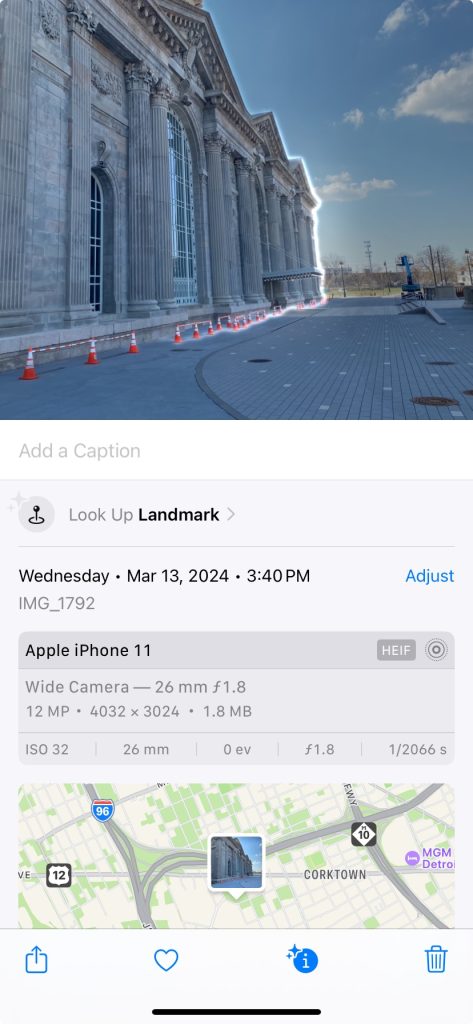
Notice the date and time taken, the device used – even the location where the asset was taken! Depending on how you configure the camera, you can also pre-populate these native fields (like photographer name or usage rights).
Most DAM systems allow you to “expose” the data as metadata values, but you must set the metadata field to transfer the data from the appropriate EXIF field. One of the more popular fields to export is Date Taken.
Administrative
Administrative fields describe external information regarding the assets. Rights and Usage fields are typical administrative fields. Documenting the rights is integral when designing your DAM metadata schema, as users will want to know whether they can use the asset for their intended purpose.
Other administrative fields may include the uploader’s name and contact information.
System-generated
This is information that is pulled from the system when the asset is ingested into the DAM, like uploader id, filename, and date ingested. You may have to explicitly request that these metadata values are presented to a user, but usually this information accompanies the asset by default.
System-generated fields are not presented on the asset metadata form.
Metadata Design
All four categories of metadata should be used when designing a comprehensive metadata schema.
Let’s look at a sample schema for our wristwatch DAM:
| Metadata Field | Type | Purpose | Sample Metadata Value |
| Title | Content-related | Unique, high-level description of the digital asset | Timex 440 Men’s Pilot Wristwatch |
| Brand | Content-related | Timex | |
| Face Color | Content-related | Silver | |
| Analog or Digital | Content-related | Analog | |
| Band Color | Content-related | Silver | |
| Band Material | Content-related | Metal | |
| Date Taken | Native | Date that the photo was taken | 3/3/2024 |
| Camera Type | Native | Hasselblad X2D | |
| Photographer | Native (Although this information may not be in the EXIF data) | Magnum Studio | |
| Ingest User | System-generated | The person who ingested the asset into the DAM | Jane Doe |
| Asset Ingest Date (Date when added to the DAM) | System-generated | 4/5/2024 | |
| Ingest User Email | Administrative | jane.doe@z-agency.com | |
| Rights involved (Y/N) | Administrative | Describes whether there are rights associated with the asset | Yes |
| Rights Information | Administrative | If the previous answer is Yes, this text box describes what rights are associated with the asset. | Digital usage only; no geographic restrictions. Rights in effect until 12/31/2026. |